Mathcad Prime 10.0
We're Australia’s and New Zealand's largest distributor of Mathcad.
Mathcad enables professionals worldwide to perform, document, manage and share calculation and design work. Mathcad's easy-to-use whiteboard interface combines live, natural mathematical notation, text and graphs into a single worksheet making Mathcad ideal for knowledge capture, calculation, sharing and reuse.

Mathcad Prime 9.0 is the latest release of Mathcad, the industry standard software for engineering calculations.
New Features of Mathcad Prime 9.0
- Symbolic Solving with Solve Block
- Partial Differential Equation Solver
- Symbolic Solving of Ordinary Differential Equationsn
- Custom color pickerr
- Go-to Page
- Text Styles
- Gradient Operator
Other key features
Intuitive Calculations and Units Management
The PTC Mathcad interface combines live, standard mathematical notation with text and graphs:
-
Integrated numeric and symbolic math allows you to see both the calculation as well as the reasoning behind designs
-
Automatic unit checking and conversion
-
Leverage hundreds of predefined units
-
Define custom units
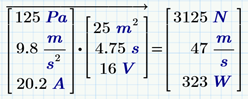
Calculation
-
Calculate using standard operators for algebra, calculus, logic, linear algebra, and more
-
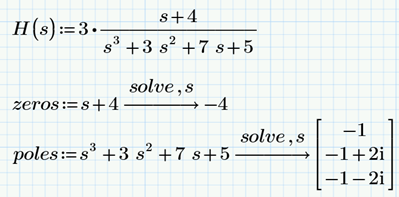
Evaluate, solve & manipulate expressions symbolically
-
Support for various data types including:
- Scalar, vectors and matrices
- Complex numbers
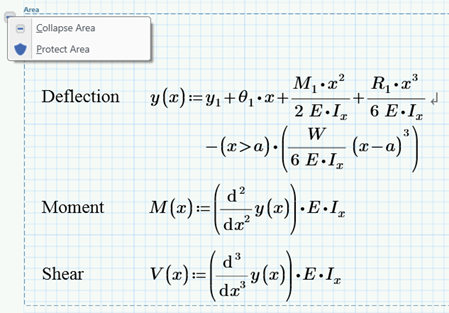
Content Protection
This provides area protection and locking so that you control the degree of access and the visibility you want others to have. Now you can show your work to a broader audience more effectively and without fear of compromising your IP.
Interoperability
-
Integrate Microsoft® Excel® component to enable bidirectional data passing with PTC Mathcad worksheet content
-
Connect to external data files using read and write functions for various file formats including:
-
Incorporate embedded content from external applications (OLE)
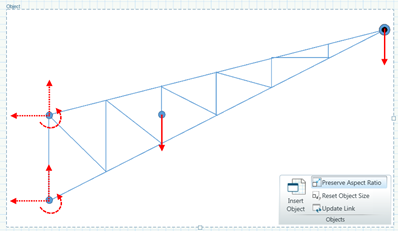
Solving
-
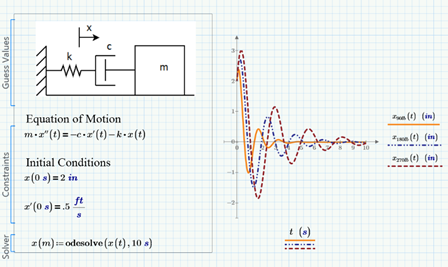
Solvers for linear and nonlinear systems of algebraic and differential equations
-
Optimize constrained systems u sing the robust and powerful KNITRO® engine
-
Display symbolic solutions to systems of equations
Programming
-
Add logic using familiar programming operators and natural math notation
-
Loops (for, while)
-
Conditional statements (if, else if, else)
-
Error catching (try/on error)
-
Build recursive functions
Functions
Don’t “do it yourself”. Mathcad includes built-in functions for all these purposes and many more, independent of industry:
-
Curve fitting and smoothing
-
Data analysis and statistics
-
Design of experiments
-
Signal and image processing
-
Fourier transform
-
Digital filtering
-
File Access
Data Visualization
Seeing is believing.
-
X Y plots scatter, line, column, bar, stem, waterfall, error, box, and effects
-
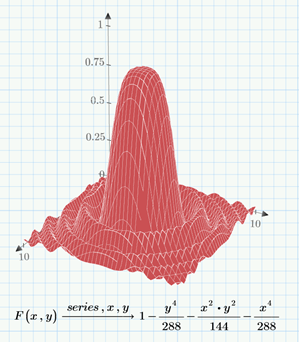
3-D plots
-
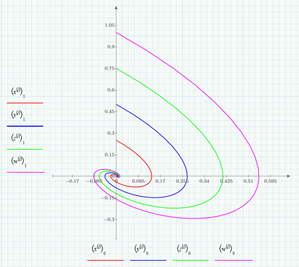
Polar plots
-
Contour plots
Mathcad 15 Features
Highlights of the enhancements in Mathcad 15.0 include:
-
Integration with Kornucopia software – Kornucopia by Bodie Technology, is designed to reduce time and effort spent on analysis by providing functions and templates using Mathcad-based documented workflows, that improves interpretations and value of experimental data and simulation results
-
Support for Microsoft Excel 2007 – Leverage the following functions and features with Excel: READEXCEL(), WRITEEXCEL(), READFILE, the data import wizard, and the Excel Add-in
Computational Capabilities
-
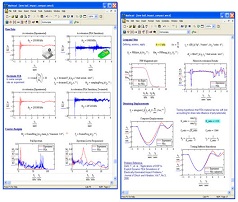
High-end numerics - Perform summations, products, derivatives, integrals, and Boolean operations; apply trigonometric, exponential, hyperbolic, and other functions and transforms.
-
Live symbolics - Simplify, differentiate, integrate and transform expressions algebraically; Mathcad’s patented live symbolics technology automatically recalculates algebraic solutions and allows you to use them in subsequent calculations.
-
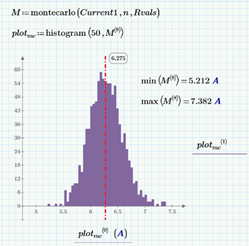
Statistical and data analysis - Generate random numbers or histograms, fit data to built-in and general functions, interpolate data, and build probability distribution models.
-
Units support - Include units in calculations, perform unit conversions,and automatically check dimensions. Add domain-specific units.Convert results to any unit system or custom values. Currency units effectively document engineering cost and economic evaluations.
Key Benefits of Using Mathcad

-
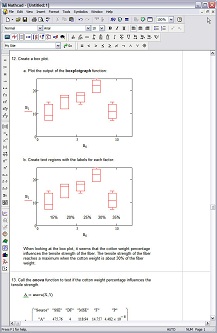
Design of Experiments (DoE) - Reduce the time and expense of conducting experiments through DoE by understanding the variable interactions that will influence the experiment. DoE helps identify critical factors and optimal settings for a complex process. It provides templates for fewer, yet more intelligent experiments which are indispensable when having multiple variables and levels.
Features
Math editing
-
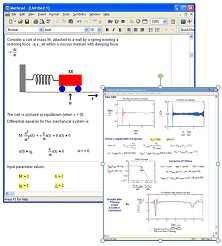
Write equations using standard math notation
-
Simple equation editor – intuitive and natural entry
-
Ribbon and / or keyboard entry
-
Use standard operators for algebra, calculus, logic, linear algebra and more
Calculation
-
Numeric evaluation
-
Symbolic evaluation, operations, and solving
-
Automatic update of results
-
Single or multithreaded calculation
-
Support for real and complex numbers
Document creation and editing
-
Document-centric, WYSIWYG approach
-
Text boxes, blocks, images, tables, plots and equations combined in a single document
-
Engineering paper-like grid for easy alignment of text and equations
-
Collapsible areas to organize and streamline the document presentation
-
WYSIWYG editing of headers and footers
-
Find/replace in text and equations
-
Toggle between page and draft views
- Save document as XPS and PDF
Units
-
Comprehensive unit support throughout all numeric and symbolic calculations, functions, solve blocks, tables, vectors / matrices, and plots
-
Automatic unit checking and conversion
-
Automatic unit reduction and highlighting
-
Hundreds of predefined units and ability to easily create more
-
Support for SI, USGS, and CGS unit systems
Functions
-
Hundreds of functions covering wide range of general and special applications
-
General purpose basic and advanced functions -- Trigonometric, hyperbolic, log, exponential, Bessel, Fourier transforms, number theory piecewise continuous, and calculus functions
-
Probability and Statistics -- Probability density, probability distribution, statistics and random number functions
-
Curve fitting, smoothing, interpolation and prediction
-
Design of Experiments (DoE) functions -- Design matrices, factor screening, ANOVA, Monte Carlo simulation
-
Other special applications -- Signal processing -- Image processing -- Finance -- Wavelet
Plotting and graphing
-
XY plots: scatter, line, column, bar, stem, waterfall, error, box, effects
-
3-D plots: scatter, surface, curve
-
Polar plots
-
Contour plots
Solving
-
Multiple advanced solvers for linear and nonlinear systems of algebraic and differential equations
-
Higher-level descriptive math in an easy to read textbook-like solve block format
-
State-of-the-art algorithms for nonlinear optimization using the robust and powerful KNITRO® engine
-
Support for parameterized modeling, enabling solutions to nested complex problems with seamless plot integration
-
Ability to incorporate symbolic results into numerical functions
Vectors and matrices
-
Linear algebra operators and functions
-
Automatic, element-wise application for many functions and operators
-
Easy and intuitive editing
Data
-
Embedded Microsoft® Excel® component allows bidirectional integration with Mathcad worksheet content
-
Spec tables for defining parameters and constants
-
Read and write function supporting a variety of data formats (text, Excel, binary, image etc.)
-
Specialized data analysis and data manipulation functions
Programming
-
Use familiar programming operators (for-loop, while-loop, if-then-else, etc.) to define functions of any complexity
-
Seamless integration of equations within programs
User interface
Integration and interoperability
-
PTC Creo® Parametric®
-
PTC Windchill 10.0
-
Open PTC Mathcad Prime 1.0 and 2.0 worksheets
-
Convert PTC Mathcad 7 through PTC Mathcad 15.0 using MCD, XMCD Converter
-
Microsoft Excel 2003, 2007, 2010
Resources, help and support
-
Integrated, context-sensitive help with live examples
-
Integrated access to the PTC LearningConnector
-
PTC standard and sustained maintenance support program
-
PTC online community
-
Integrated license acquisition and management
Specifications
-
64-bit or 32-bit versions available for Windows® XP (SP3), Windows Vista®, Windows 7
-
Available in English, French, German, Japanese, Italian, Spanish, Korean, Russian, and Chinese (Simplified and Traditional)